Clean Up Folder
Deletes all files and folders from a specified folder.
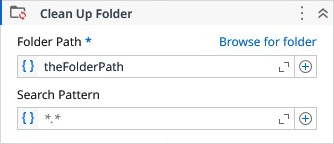
Properties
| Name | Description | Required |
|---|---|---|
| Folder Path | The folder path to be cleaned up. | ✓ |
| Search Pattern | The search string defines file name patterns in the path. It supports literal text and wildcards (, ?, !, |), but not regular expressions. Use ! for exclusions (e.g., !.txt), and | for multiple patterns (e.g., .png|.gif|.jpeg). Default is .* (all files). | |
| Files Deleted | The number of files that were deleted. | |
| Folders Deleted | The number of folders that were deleted. | |
| Last Write Time | Deletes only the files with last write time till this reference date. Default is DateTime.Now. | |
| Delete Empty Folders | Determines if the left empty folders after files deletion must also be deleted. | |
| Search Option | Specifies whether the search operation should include only the current directory or should include all subdirectories. | |
| Continue on error | Specifies to continue executing the remaining activities even if the current activity failed. Only boolean values are allowed. |